
25.8 Release Notes
Highlights
Patron Privacy Preference
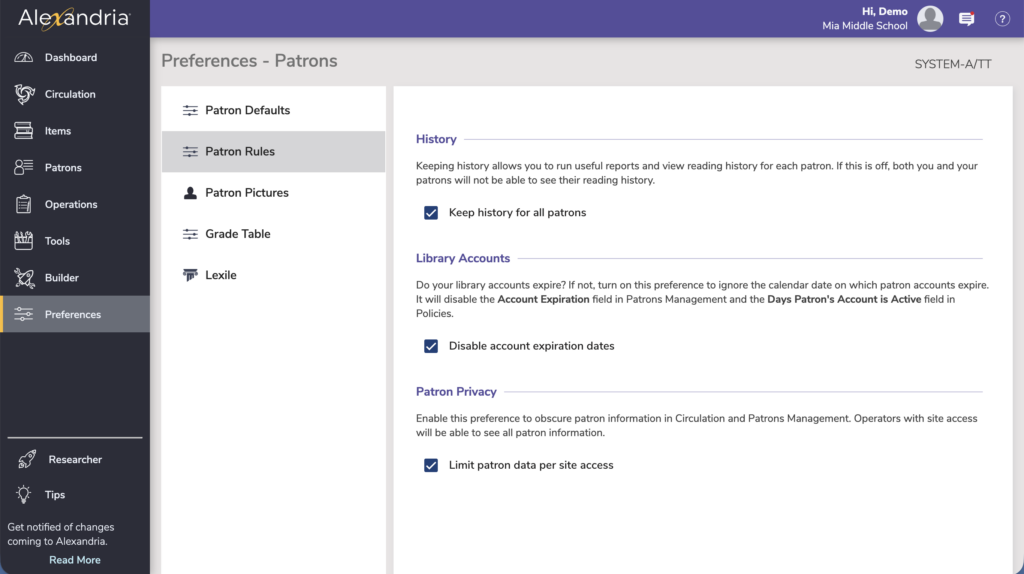
For centralized catalogs, the Site Access of your operators may be limited to the site (or district) they work at. Operators can only edit records belonging to the sites they have access to. However, by default, operators can view patron information in Circulation (and Patrons Management) to perform regular library operations. Now we have a new Patron Preference to “Limit patron data per site access”. Turn this on to restrict viewing patron information to patrons belonging to sites you (the operator) have access to.
Important
- Please review your Security settings for your patrons and operators, as some options have changed.
- Are your Explore Builder panes taking a long time to load, or they don’t seem to save when you make changes? It’s probably due to button images that are too large. Explore Builder no longer lets you add images that are over 250k—it will resize those images for you. For existing images, you can hold down the option key and click on the Action menu to reveal a new option to ‘Resize images’.
New and Improved
General
- We’ve made further accessibility improvements to Librarian.
- Did you know you can get a quick breakdown of your sites and record counts? Go to Sites Management > actions menu > and run the Site Record Counts report. The report now includes a date stamp and total number of sites.
Builder
- You can now drag and drop images in Explore Builder as you add and change buttons!
Search
- Did you know you can perform begins-with searches in Alexandria? We’ve made it even easier. In Search or Scout, add an asterisk to a term to cover variable endings, for example dystopia* which will find dystopias and dystopian.
Circulation
- Temporary Item checkouts now specifically note temporary items in the transaction log on checkout.
Operations
- Usage by Period reports now show the date range in the reports.
- The Loaned Items Notice email and 2-per-page formats now show the Author information.
- If you find yourself needing to change due dates often, you might want to review your policies and policy exceptions. However, if it’s time for the good ol’ Change Due Date utility, well, you can now select by Call Number (Alexandria Librarian) or Title ID (Textbook Tracker). Thanks to Mary Lamb Glenwood Springs High School for this suggestion.
- Needed for Reservation Notice has been renamed Needed for Reservation List.
- The Temporary Items Information report 1-line format has been renamed Brief. The In-Stock Hold Notice report ‘standard’ format has been renamed Letter.
- There is now a Transaction Date Range option for the Refunded Payment report, so you can find refunds in a specific date range.
- Export Items, Copy Based has a new option (turned on!) to only include copy (852) data for the site you selected by.
Fixed
Circulation
- Patron History report had overlapping text when there were long call numbers. Now call numbers are truncated.
- Solved a brief issue where previous checkouts weren’t showing in Copy Stats.
Items
- We’ve fixed an issue with phantom duplicate items showing in Items Management due to Maps set up with overlapping call numbers. In general, try to avoid creating Maps with overlapping call numbers.
Operations
- We’ve fixed issues with the ‘Overdue Items or Unpaid Charges’ and the ‘Unpaid Charges’ Notices.
Explore Builder
- There were some issues with images when exporting and importing explore panes. Images now import properly.
Search
- The Year sort in Search was sorting results from oldest to newest, which just isn’t all that helpful. We’ve reversed it so the items with the most recent publication year show first.
- The hotkey to show hidden items in Search done got broke. We done fixed it. Hold down Option / Alt when conducting a search to see hidden items!
- The scroll bar in Group Search was missing and we’ve found it and put it back.
Clever
- We’ve fixed issues syncing new records with Clever.