Patron privacy
March 16, 2026
Privacy is important, and we’ve made some updates pertaining to patron privacy options. Let’s review the new setting, and how you can take additional measures to protect the privacy of your patrons.

Limit patron data per site access
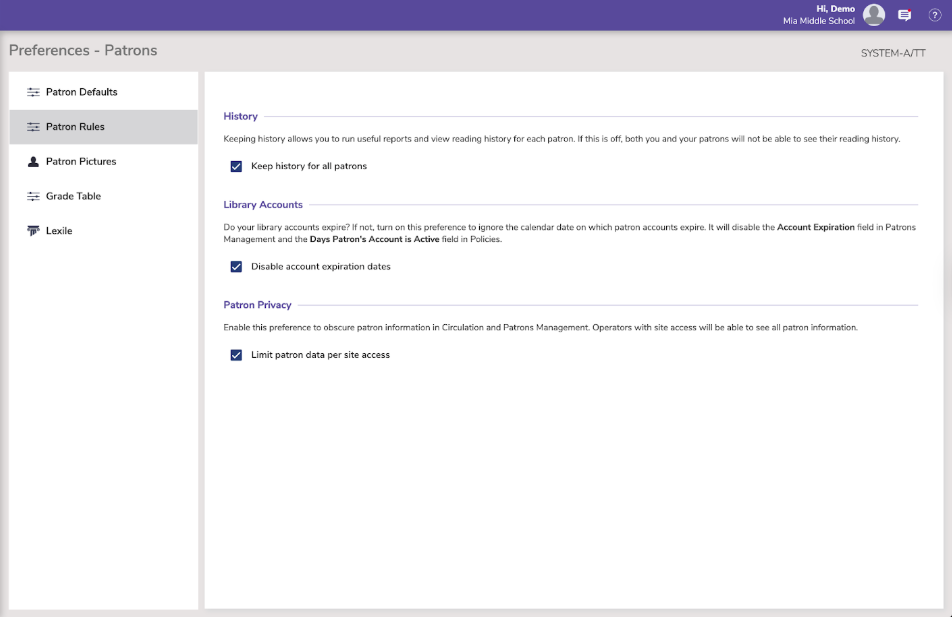
Turn on this new Patron preference to restrict viewing patron information to patrons belonging to sites the operators have access to. This means those patrons won’t become current in Circulation, their information will be hidden in Circulation tabs/dialogs, and you can’t view them in Patrons Management.
Select this by going to Preferences > Patrons > Patron Rules > Patron Privacy.
Giving additional site access
If some operators need additional site access, bring up the Operator that you want to modify in Patrons Management. With the record unlocked, go to the Access tab and select each of the sites you are giving them access too. Click Save.
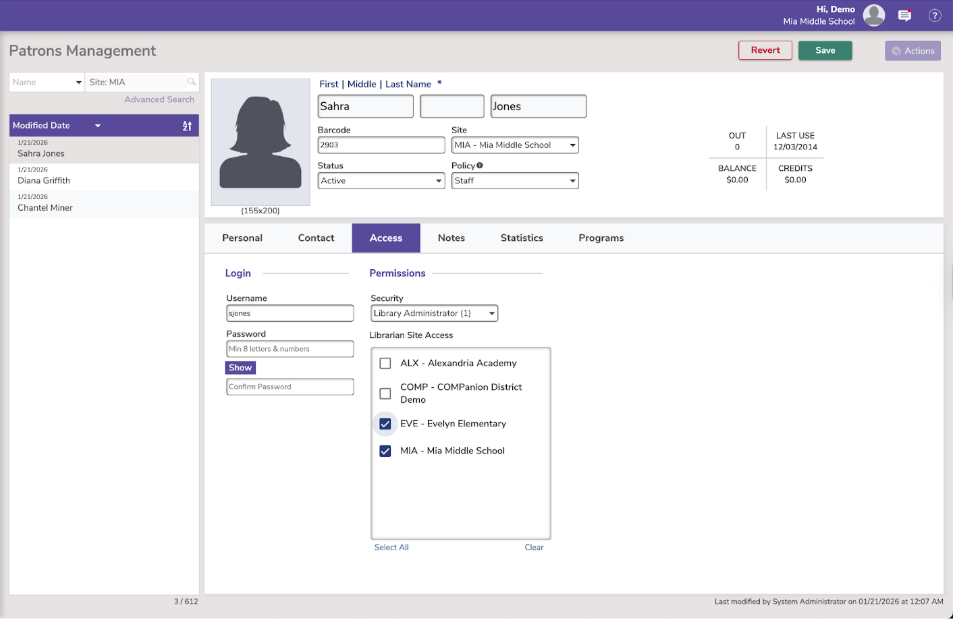
Remember: Operators with security District Administrator have access to all sites by default and thus can see all patron information.
 | In our next release, we’ve added another new Circulation security option for ‘View Details and Items out’. You can turn this off for any relevant security group, to keep student aides from having access to details of what other students have checked out. |
Additional reading…
 | Have questions? Reach out to our stellar support team at (800) 347-4942 · support@companioncorp.com for help! |
0 Comments