
Copy location: quick change!
November 23, 2026
There’s a stack of books on the counter for a new “Books We’re Thankful For” display, and Miss Honey needs to quickly change the copy location for those books in Alexandria. Did you know there’s a Circulation command for that?

The CH command is great for updating copy locations for a display, for genrefying (using the copy location field), and for central unions that have a warehouse sending items.
Update your copy location
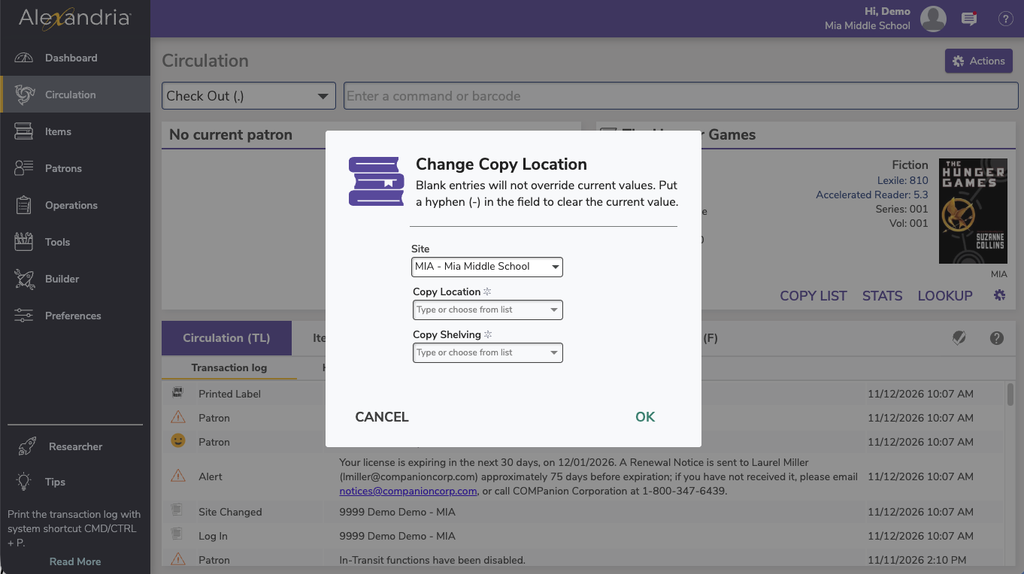
- Type CH into the command line and press <enter>. This opens up the Change Location window which allows you to provide new values for Copy Site, Copy Location, and Copy Shelving.
- Provide new values for one or multiple locations, if desired. Leaving an entry blank will not override current locations.
- Put a hyphen “-” in a location field to clear current copy locations.
- Click OK.
- Scan the item barcodes of the copies you are modifying.
- Use the X command to exit this mode.

Monarch® is a single Search Engine for ALL your Discovery Services and Digital Libraries that returns your search results in an single interface, categorized and summarized in a very intuitive experiences for you and your students!
Contact our Sales Team if you’re interested in adding it to your library.
0 Comments