
Updating z39.50 servers
September 21, 2026
Miss Honey saw the notice on the support center that we’ve updated our default z39.50 servers. Before she adds some new items into Alexandria, she needs to update her preferences. Let’s walk through it.

Adding/Modifying the default set
To modify these Preferences yourself in Alexandria, head to Preferences > Z39.50. On the left (under COMPanion Default Set) are the current in-use servers. On the right are available entered servers. You can enter new database information by clicking the ‘+’ located in the bottom right.
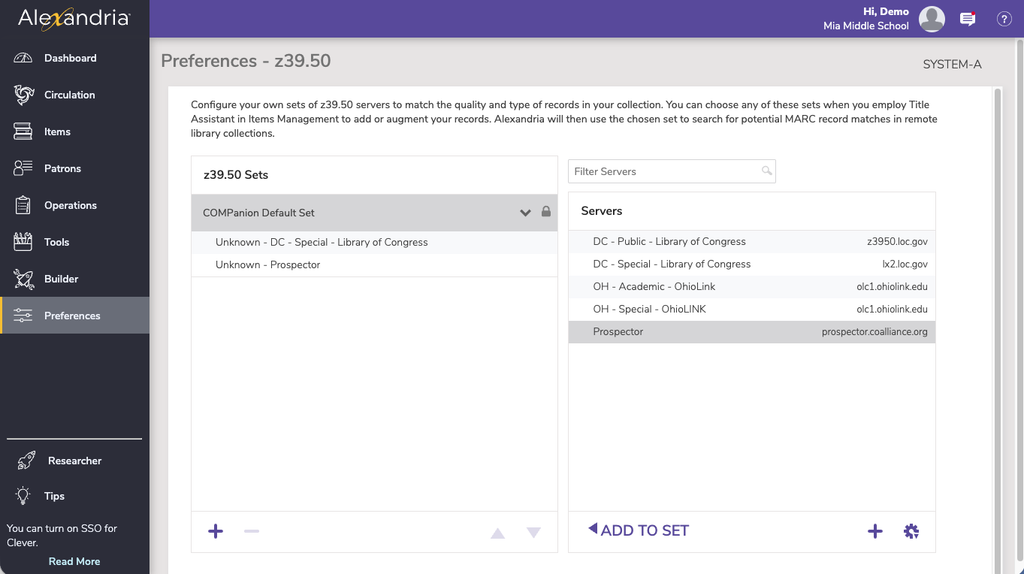
To add servers from your available list:
- Click COMPanion Default Set
- Select the server you would like to add
- Click ‘ADD TO SET’ to the searchable sets
To remove servers:
- Click the server that is not needed
- Navigate to the bottom left and click the minus button
- Click ’Remove’

Further reading…
 | Have questions? Reach out to our stellar support team at (800) 347-4942 · support@companioncorp.com for help! |
0 Comments