
Email verification: check!
August 10, 2026
Miss Honey’s librarians are asking her why they received an email verification notice from Alexandria. Why is email verification important, and how does it work in Alexandria? Let’s get into it.
Email verification improves security (by ensuring the person using the email address is the owner of that address), and makes passwords infinitely easier to reset, meaning your operators and patrons won’t get locked out of their accounts.
Setting up email verification
To require email verification for certain security groups, go to Tools > Security > Account > Request Email Verification.
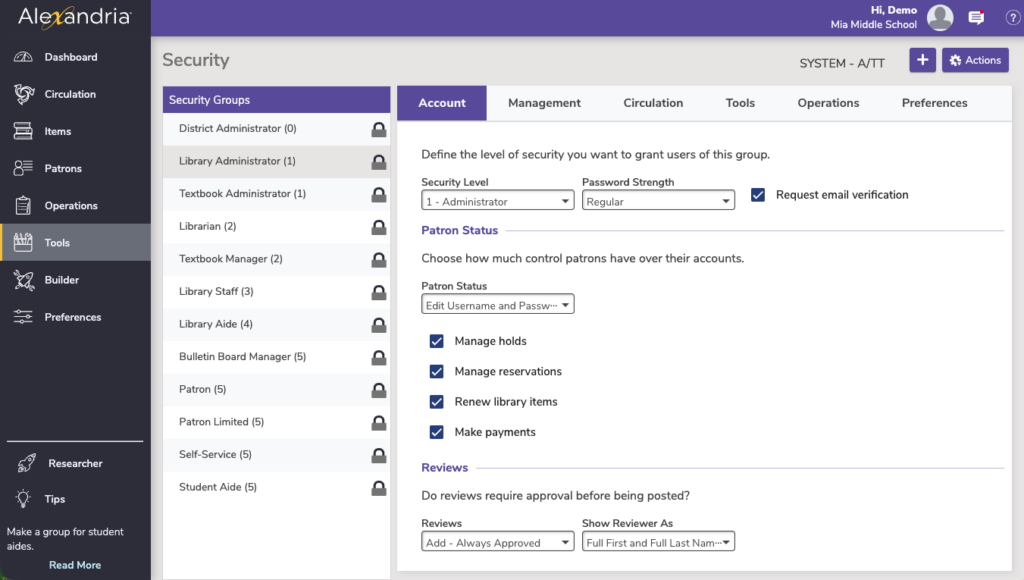
Turn this on for each security group you want to receive email verifications. While this is not required for all operators, we highly recommend it.
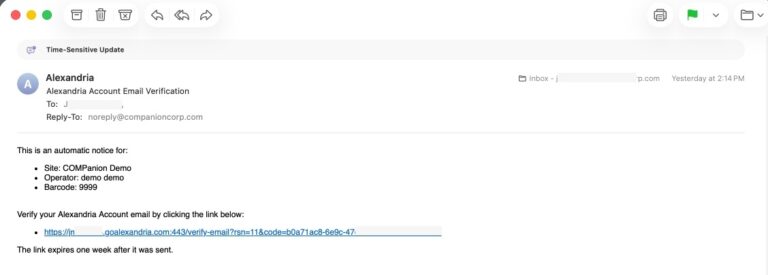
Note that as of this release, operators of Administrator level or higher will receive an email verification request after they sign in. To make the emails stop coming, they just need to verify their email (shown below).
 | Verification emails are sent differently than Alexandria notices and automatic emails. If you want to send emails to patrons regarding which items they have checked out, holds that are ready for pick up, etc. you still need to set up email preferences. |
Additional reading…
 | If you’re new to Alexandria, or just need a little refresher, we’ve got you! Check out our new printable, foldable cheat sheet for a quick visual reference you can keep on your counter. |
0 Comments