
Library usage totals? Copy that!
March 30, 2026
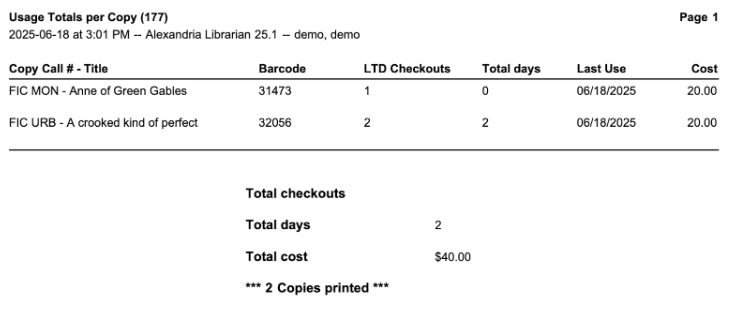
With the rising tide of ebooks, have you ever wondered how much your physical library is actually being used? Did you know there’s a report to see the usage of copies and the total cost of your library for items that are circulating? Welcome to the Usage Totals per Copy report–a quick and easy way to see just how much your patrons are keeping it old school.

Usage Totals per Copy Report
- Go to Operations > Reports.
- Click Add report.
- Select Statistics/Usage from the categories on the left, then Usage Totals per Copy from the list of reports to the right.
- Recommended Selections: Copies with Life to Date Usage of — 1 – 9999 and Copies last used between with your chosen date range.
- Need to exclude equipment? You can also include a selection for Copies with a Policy of.
- On the Options tab, select how you would like to sort the results.
- Click Run. If you would like to save this report template for future use, click Save and Run.
- The report can be retrieved from the Message Drawer or Operations.
 | Have questions? Reach out to our stellar support team at (800) 347-4942 · support@companioncorp.com for help! |
0 Comments