
Adding patron alert notes by utility
February 17, 2026
Miss Honey needs to set up patron alert notes for several students, because some states and school districts require the ability to notify parents of what patrons are checking out from the school library. Patron alert notes can help her remember which patrons need printed or emailed receipts.
Since she only needs to print or send receipts to some patrons (and their parents), but not all, she can set up patron alerts one-by-one, or she can batch add them by using a utility.

To add patron alert notes with a utility:
- Go to Operations > Utilities and unlock utilities by clicking the padlock at the top right.
- Click Add utility.
- Select Patrons > Add Patron Notes.
- Use the Selections tab to choose who you would like to add the note to. By clicking Show Additional at the bottom of the window, you can use Patrons with Barcodes to enter patron barcodes in a list format.
- On the Options tab, enter what you want the note to say and select Alert Note as the note type.
- Click Run and confirm the utility.
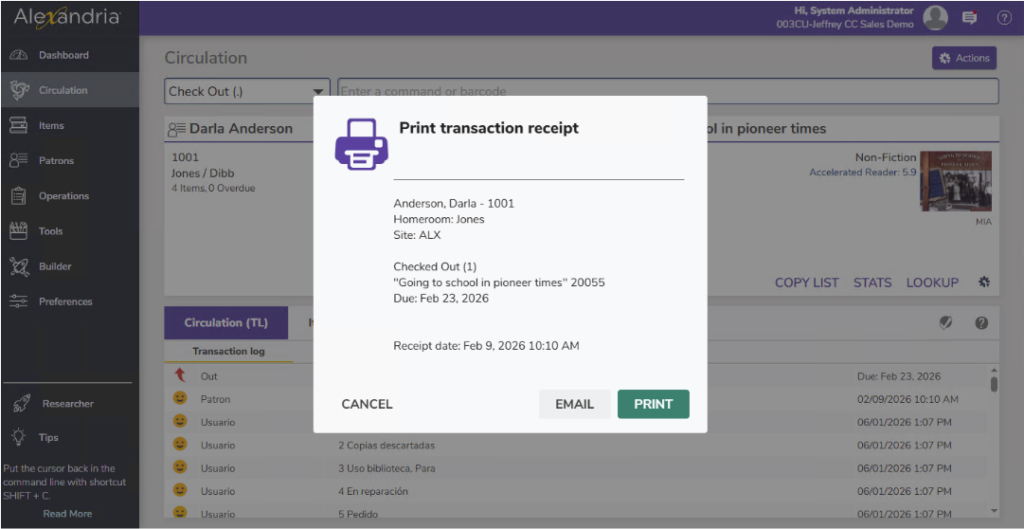
Once a patron with an alert note is done with circulation, use the D command to print or email a transaction receipt.
Want to send a daily email notice to everyone that has checked out items today? Check out the loaned item notice how-to for instructions on setting up the notice on a daily schedule.
You can also schedule Alexandria to Send Patron Details Email (Operations > Notices > Patron Account > Send Patron Details Email) in a brief format to exclude title information!
 | To send emails through Alexandria, email preferences will have to be set up! Check out our integrated email services to keep it simple, or review email preferences and email notices best practices. |
 | Have questions? Reach out to our stellar support team at (800) 347-4942 · support@companioncorp.com for help! |
0 Comments